















 0 comments





The short answer for leaders: No, AI can’t replace your mobile app team in 2026, but it should change how you staff, budget and govern it. AI now handles a large share of routine coding, testing and documentation. Your developers’ value has moved to architecture, security, product judgment and accountability for what ships. The companies getting the best results aren’t cutting their teams to zero. They’re building smaller, more senior, AI-assisted teams with clear rules for how AI is used.
Most boards and leadership teams are now asking the same question: if AI can write code, why are we still paying for developers?
It’s a fair question, and the answer isn’t “AI is overhyped” or “AI will do everything.” The 2026 data shows something more useful for decision-makers. AI is changing which work developers do and how many people a project needs, but it hasn’t removed the need for people who own the outcome.
This guide is written for CEOs, CTOs and product leaders who have to make real decisions: how to structure mobile teams, what to expect on cost and speed, where the risks are, and how to choose a development partner in the AI era.
What Does the 2026 Data Tell Leaders About AI and Developers?
The evidence points to task automation, not role elimination, with a few warning signs leaders should take seriously.
| Signal | What the data shows | What it means for you |
| AI adoption | 73% of developers who use AI coding tools use them daily (Stack Overflow, Oct 2026) | AI-assisted development is now standard practice, not an experiment |
| Trust in production | Only 20% use AI for deploying or operating production systems (Stack Overflow 2026) | Developers still don’t trust AI with high-stakes work, and neither should you |
| Need for verification | 93% need source attribution to trust AI output (Stack Overflow 2026) | Review and governance processes matter more than ever |
| Real productivity | Experienced developers were 19% slower with AI on familiar, complex code (METR, 2025) | Don’t assume AI cuts every timeline; measure it |
| Job market | US software developer jobs projected to grow 15.8% from 2024 to 2034 (BLS, July 2026) | Experienced developers will stay in demand and keep their market value |
| Entry-level shift | Employment for 22–25-year-olds in the most AI-exposed jobs fell about 16% relative to others by Oct 2025 (Stanford Digital Economy Lab, Feb 2026) | Teams are hiring fewer juniors, which creates a future talent gap |
Read together, these numbers tell a consistent story. Developers have embraced AI for everyday work, but they draw a firm line at production systems and anything they can’t verify. Demand for experienced engineers is still growing, while the bottom rung of the career ladder is getting thinner. For leaders, the takeaway isn’t “replace developers” or “ignore AI.” It’s “redesign how your team works.”
Where Does AI Fit Across the Mobile App Lifecycle?
AI’s impact isn’t the same at every stage of building an app. Some stages gain a lot, others very little. This view helps leaders decide where to invest in AI tools and where to protect senior time.
| Lifecycle stage | What AI does well | What people must own | AI impact |
| Discovery and research | Summarises market research, competitor apps and user feedback | Choosing the problem, target users and business model | Medium |
| Product planning | Drafts user stories, acceptance criteria and feature lists | Prioritisation, scope and trade-offs | Medium |
| UI/UX design | Generates layout ideas, copy variations and early prototypes | Brand, usability, accessibility and final design decisions | Medium |
| Architecture | Suggests patterns and compares options | Tech stack, scalability, security and cost decisions | Low |
| Development | Writes boilerplate, components, API clients and simple features | Complex logic, integrations and code review | High |
| Testing and QA | Generates unit tests and test data, flags simple bugs | Test strategy, device testing and release sign-off | High |
| Security and compliance | Flags common vulnerabilities | Threat modelling, compliance and audit accountability | Low |
| Release and store submission | Drafts release notes and store listings | Policy compliance, privacy disclosures and rejections | Low |
| Maintenance | Updates dependencies, suggests fixes and documents code | Incident response, performance and long-term roadmap | Medium |
The pattern is clear. AI has the biggest impact in the middle of the lifecycle (development and testing), and the least at the start and end, where business judgment and accountability matter most. That’s also where leaders should keep their most experienced people.
What Work Can AI Take Off Your Team’s Plate?
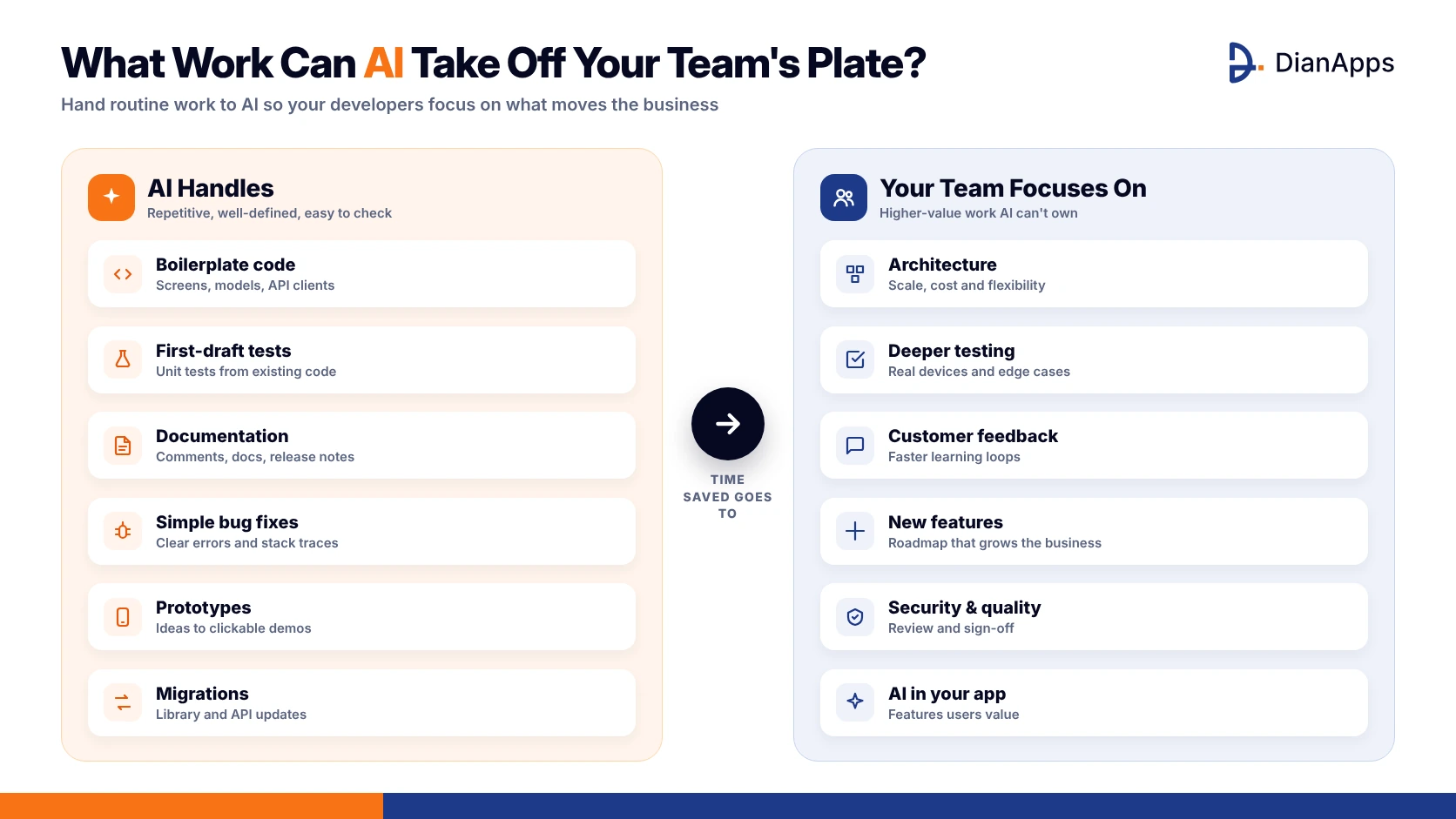
AI delivers the most value on work that is repetitive, well-defined and easy to verify. For a mobile team, that usually means:
- Scaffolding and boilerplate: standard screens, data models, API clients and UI components.
- First-draft tests: unit tests and test cases based on existing code.
- Documentation: code comments, technical docs and release notes.
- Simple bug fixes: issues with clear error messages.
- Prototypes: turning ideas or designs into clickable demos in days instead of weeks.
- Migrations and refactoring: updating outdated libraries or APIs, with review.
For leaders, this is where the cost and speed gains come from. McKinsey research found developers can complete some coding tasks up to twice as fast with generative AI, mainly documentation, new code and refactoring.
AI coding agents are also changing how this work gets done. In Stack Overflow’s 2026 survey, coding agents (66%) were the most common type of AI tool among developers who use AI, ahead of chatbots (63%). Instead of suggesting one line at a time, agents can take a task, change several files and run tests. That’s powerful, but it also means more code arrives at once for someone to review.
The practical effect for a leadership team is that work your developers used to spend days on, like setting up a new screen or writing a first round of tests, can now take hours. The time saved should go into higher-value work: better architecture, deeper testing, faster customer feedback loops and new product features.
What Must Stay with Experienced People?
These are the areas where AI mistakes become business risks, and where accountability has to sit with a named person:
- Architecture decisions that determine how your app scales, what it costs to run and how easy it is to change later.
- Security and data protection, including compliance with HIPAA, GDPR, PCI DSS or industry rules.
- App Store and Google Play compliance, including privacy disclosures. Apple’s review guidelines now require apps to disclose and get permission before sending personal data to third-party AI.
- Product decisions about what to build, for whom, and why.
- Production incidents, where downtime or data loss has a direct cost.
- Vendor, client and stakeholder relationships.
A useful rule for leadership teams: AI can draft, but people must decide and sign off.
Mobile apps also come with platform-specific challenges that AI handles poorly:
- Device fragmentation: Android apps run on thousands of device models with different screen sizes, memory limits and OS versions.
- Platform rules: iOS and Android limit background processing, battery use and permissions in ways that change every year.
- Store review: an app can be rejected for privacy, payment or content issues, and fixing that needs someone who understands the guidelines.
- Offline and network conditions: real users lose signal, switch networks and expect the app to recover gracefully.
These are the details that separate an app that works in a demo from one that earns good ratings in the real world.
Can AI Actually Reduce Mobile App Development Costs?
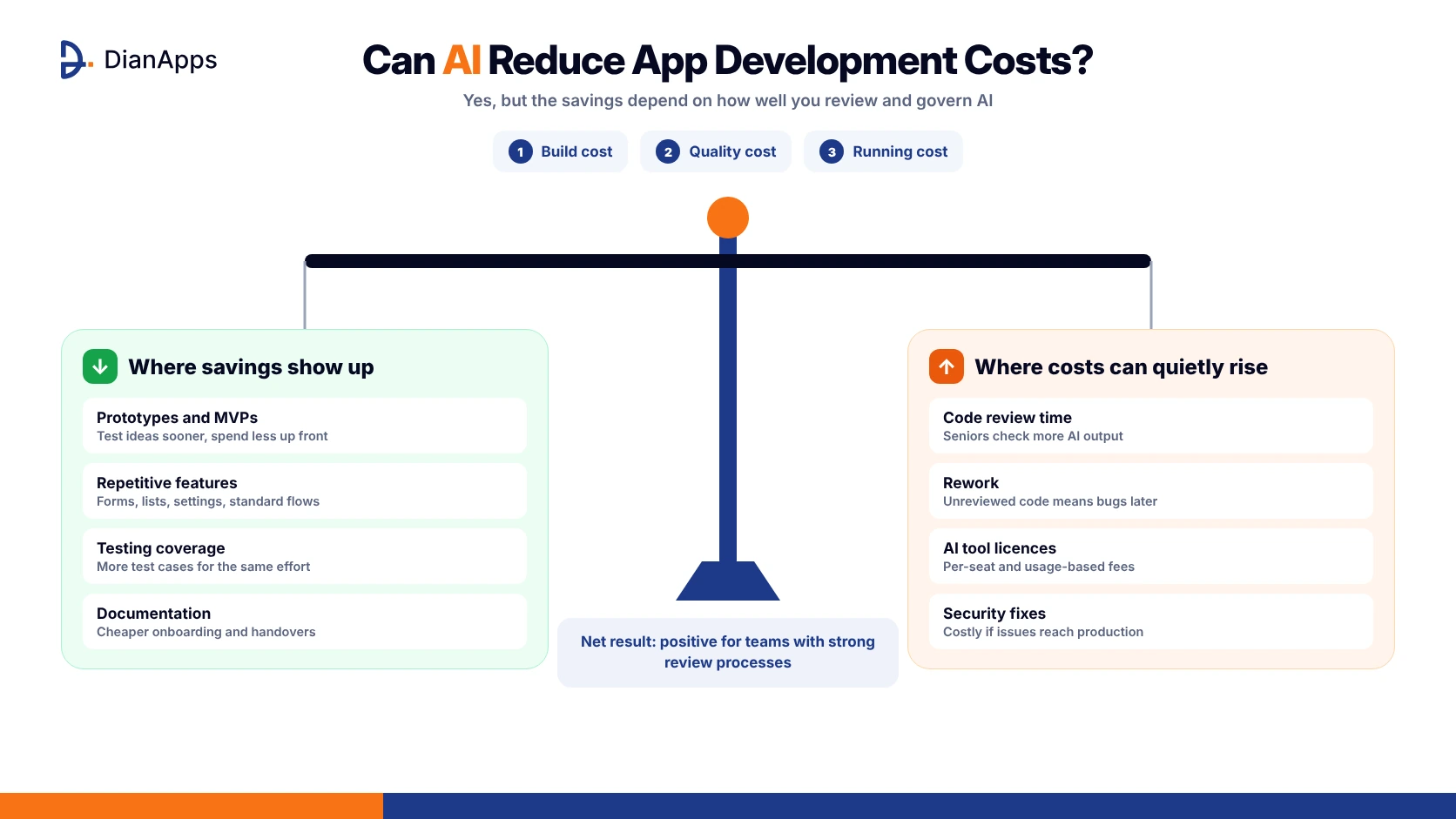
Yes, but less, and less evenly, than many vendors suggest. Leaders should think about cost in three layers:
- Build cost: AI can reduce effort on routine tasks, which shortens prototyping and early development. The biggest gains are on new, simpler work.
- Quality cost: AI-generated code still needs review. Without it, savings during the build turn into bugs, security fixes and rework later.
- Running cost: if your app includes AI features, cloud AI APIs add a per-use cost that grows with users. On-device AI, such as Apple’s Foundation Models framework and Google’s Gemini Nano, can remove that per-request cost for supported devices.
The METR study is a useful warning. Experienced developers expected AI to make them 24% faster, felt 20% faster afterwards, but were actually 19% slower on complex work they already knew well. They accepted fewer than 44% of AI suggestions, and reviewing the rest took time. Ask for measured delivery data, not impressions.
Where the savings usually show up
- Prototypes and MVPs: faster early versions mean you can test ideas with real users sooner and spend less before you know what works. See our guide on what an MVP is in app development.
- Repetitive features: settings screens, forms, lists and standard flows take less time to build.
- Testing: AI-generated test cases increase coverage for the same effort.
- Documentation and handover: better documentation lowers the cost of onboarding new developers or switching vendors.
Where costs can quietly rise
- Code review time: senior engineers spend more time checking AI output.
- Rework: poorly reviewed AI code creates bugs that cost more to fix after release.
- AI tool licences: coding assistants and agents add per-seat or usage costs. Stack Overflow’s 2026 survey found 21% of developers said their organisations are spending more on AI.
- Security remediation: vulnerabilities in generated code can be expensive if they reach production.
The net effect is usually positive for teams with strong review processes, and disappointing for teams without them. For a broader budget view, see our breakdown of AI development costs.
Why Should Leaders Think About AI Inside the App, Not Just in Development?
Many leadership discussions focus on AI as a way to build apps cheaper. The bigger opportunity is often AI as a feature that makes your app more valuable.
The commercial signals are strong. Apple reports that in 2025, more than 40 of the top 100 apps by App Store billings included consumer-facing AI features, and those apps saw 4 times higher growth in billings (Apple Newsroom, June 2026, Apple-commissioned study). Sensor Tower estimates that generative AI app downloads doubled to 3.8 billion in 2025, with in-app purchase revenue nearly tripling to more than $5 billion (Sensor Tower, State of Mobile 2026).
Examples of AI features that create business value:
- Smart search and recommendations that help users find products or content faster
- In-app assistants that answer questions and reduce support costs
- Document and image understanding for receipts, IDs, forms and inspections
- Personalisation that adapts the app to each user
- Automation that removes repetitive steps from user workflows
Leaders also need to decide where that AI runs. Cloud AI (from providers like OpenAI, Anthropic and Google) is the most powerful but adds per-use costs and sends data off the device. On-device AI, such as Apple’s Foundation Models framework and Google’s Gemini Nano, is private, works offline and has no per-request cost, but only runs on newer devices. Most companies end up with a hybrid of the two. Our comparison of on-device AI vs cloud AI explains the trade-offs in more detail.
Should You Replace Developers with AI or No-Code Tools?
For most companies, no. AI app builders and no-code tools are excellent for testing ideas quickly, and many leadership teams now use them to validate concepts before committing budget. But a production app that customers rely on needs:
- Secure authentication, data storage and backend systems
- Payments and subscription handling
- Integrations with your CRM, ERP and other business systems
- Performance across hundreds of device models
- Store approval and updates for every new iOS and Android release
- Monitoring, support and someone accountable when things break
A practical approach: use AI and no-code to prototype, then have an experienced team build the production version. This keeps early spending low and avoids rebuilding a fragile app later.
Build in-house, partner, or use AI tools? A decision guide
| Your situation | Best-fit approach | Why |
| Testing a new idea with a small budget | AI app builder or no-code prototype | Fast, cheap validation before major investment |
| Launching a customer-facing MVP | Development partner with AI-assisted delivery | Production quality without building a full team first |
| Core product that defines your business | In-house core team, plus a partner to scale | Keeps strategic knowledge inside the company |
| Regulated industry (healthcare, finance) | Experienced partner or senior in-house team with compliance expertise | Security and audit requirements need accountable people |
| Internal tools with low risk | AI tools with light developer oversight | Speed matters more than polish |
| Adding AI features to an existing app | Specialist partner with AI integration experience | Model selection, privacy and cost control need expertise |
Get AI speed with enterprise-grade accountability
DianApps builds iOS, Android and cross-platform apps with AI-assisted workflows, while senior engineers own architecture, security and quality. Get a clear estimate for a faster, safer build.
How Should CTOs Restructure Mobile Teams for AI?
Team structures are already changing. Here is how a typical mobile team is evolving:
| Area | Traditional team | AI-assisted team (2026) |
| Team size | Larger, with many junior developers | Smaller, more senior core team |
| Junior roles | Write boilerplate and simple features | Review AI output, test, and learn faster with AI support |
| Senior roles | Code and review | Architecture, AI governance, code review, mentoring |
| QA | Mostly manual testing | AI-generated tests plus human-designed test strategy |
| New roles | — | AI integration engineers, mobile ML specialists |
| Key metric | Features shipped | Features shipped, defect rate and time to production |
Two leadership decisions matter most:
- Keep a junior pipeline. If you stop hiring juniors entirely, you won’t have the senior developers you need in three to five years. Use AI as a training tool, not a replacement.
- Invest in senior review capacity. More AI-generated code means more code to check. Review, not typing speed, is becoming your main bottleneck.
The skills CTOs should hire and train for
When hiring or upskilling mobile developers in 2026, look for:
- AI-assisted development skills: using tools like GitHub Copilot, Claude Code, Gemini Code Assist or Amazon Q Developer productively, and knowing when not to use them.
- Code review and verification: spotting subtle bugs, security issues and performance problems in AI-generated code.
- Architecture and system design: the skill that grows in value as routine coding is automated.
- AI feature integration: building on-device and cloud AI into apps safely and cost-effectively.
- Product and communication skills: turning business goals into clear specifications for both people and AI tools.
Developer appetite for this is high. In Stack Overflow’s 2026 survey, 79% of developers said they want to upskill in AI, so a structured training budget is likely to be well received and can help retention.
What AI Governance Do You Need in Your Development Process?
If your team or vendor uses AI to write code, you need clear rules. A simple governance framework should cover:
- Approved tools: which AI coding tools and models can be used, and under what licences.
- Data rules: what source code, customer data and secrets can be shared with AI tools.
- Mandatory review: every AI-generated change is reviewed by a qualified developer before merging.
- Security checks: automated security scanning and dependency checks on all code.
- Production boundaries: clear limits on AI’s role in deployment and operations.
- IP and ownership: contracts confirming you own all code, including AI-assisted code.
- Measurement: track defect rates, cycle time and incidents, not just output volume.
Stack Overflow’s 2026 survey found organisations are already setting cost controls such as usage limits (38%) and reviewing spending data (28%), so governance should include AI tool costs too.
AI risk register for mobile development
Use this as a starting point for your own risk review:
| Risk | What can go wrong | How to reduce it |
| Security vulnerabilities | AI-generated code includes insecure patterns | Mandatory review, automated security scanning, secure coding guidelines |
| Data leakage | Developers paste customer data, secrets or proprietary code into AI tools | Approved enterprise tools, clear data rules, secret-scanning |
| IP and licensing | Unclear ownership or licence issues in generated code | Contract clauses on ownership, approved tools with clear terms |
| Compliance | Apps violate HIPAA, GDPR or store privacy rules | Compliance review before release, privacy-by-design checklists |
| Over-reliance | Team loses deep understanding of its own codebase | Documentation, code walkthroughs, senior ownership of key modules |
| Hidden quality debt | Fast delivery now, expensive fixes later | Track defect rates and change failure rate, not just speed |
| Vendor or model lock-in | Features depend on one AI provider | Abstract AI providers behind interfaces, keep fallback options |
| Rising AI costs | Usage-based AI bills grow with team size or app users | Budgets, usage limits, on-device AI where suitable |
How Do You Measure Whether AI Is Actually Helping?
Don’t judge AI by how fast your team feels. Track a small set of business-level metrics before and after adoption:
- Lead time: how long it takes from idea to release
- Defect rate: bugs found in testing and after release
- Change failure rate: how often releases cause incidents
- Cost per feature: total delivery cost divided by features shipped
- Team capacity: how much roadmap work gets delivered each quarter
- App quality: crash-free sessions and store ratings
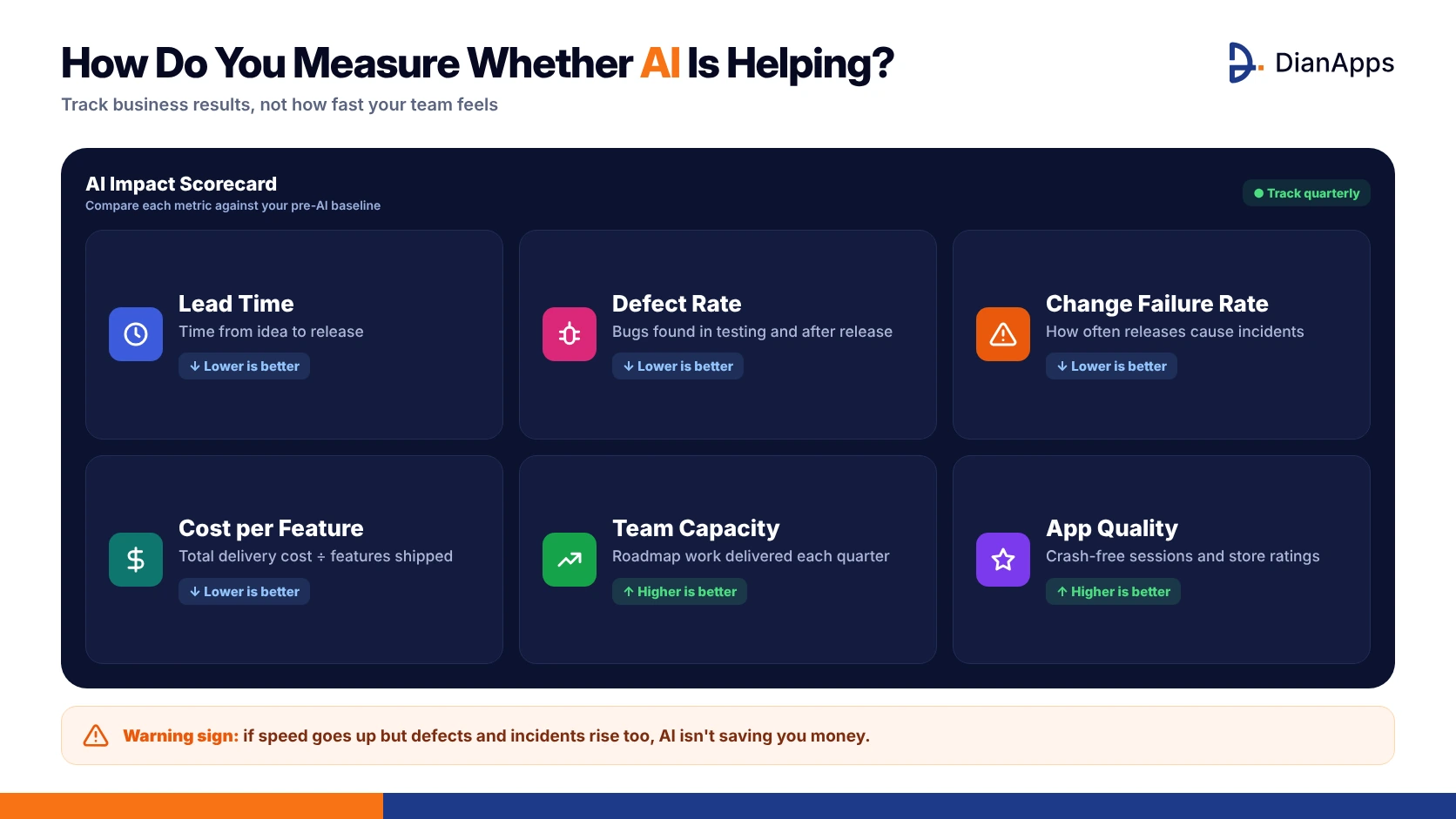
If speed goes up but defects and incidents rise too, AI isn’t saving you money.
Measure a baseline for at least one quarter before rolling AI out widely. Without a baseline, you’ll be relying on opinions, and as the METR study showed, developers’ own sense of speed can be wrong.
A 90-Day AI Adoption Plan for Mobile Teams
For CTOs who want a structured way to adopt AI without disrupting delivery, this plan works well for most teams:
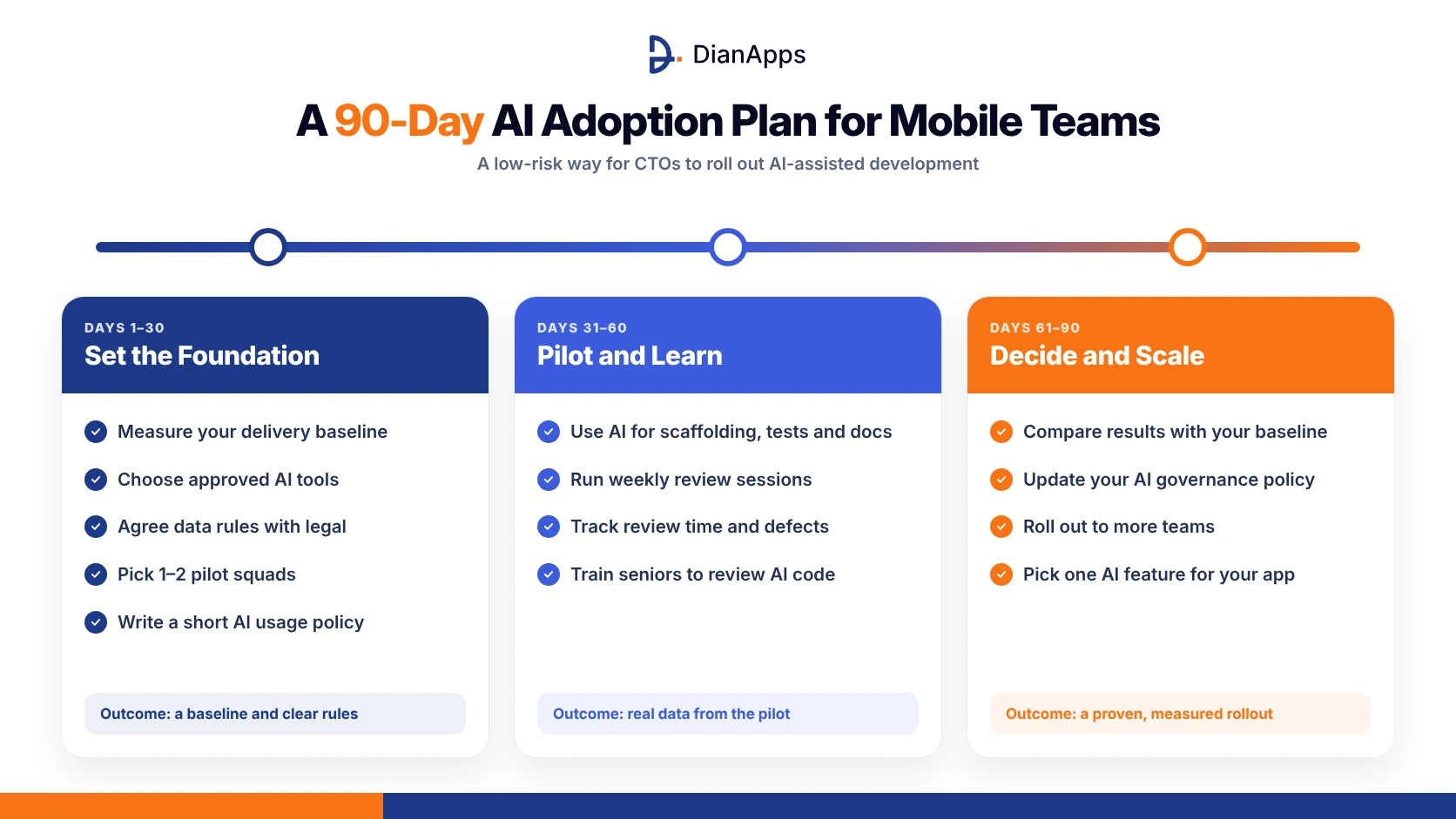
Days 1–30: Set the foundation
- Measure your current lead time, defect rate and release frequency.
- Choose approved AI tools and agree on data rules with security and legal.
- Pick one or two pilot squads and low-risk projects.
- Write a short AI usage policy covering review, security and ownership.
Days 31–60: Pilot and learn
- Use AI for scaffolding, tests and documentation in the pilot squads.
- Hold weekly reviews of what’s working and what isn’t.
- Track review time, defects and developer feedback.
- Train senior developers on reviewing AI-generated code.
Days 61–90: Decide and scale
- Compare pilot metrics against your baseline.
- Update your governance policy based on what you learned.
- Roll out to more teams where results are positive.
- Identify one AI feature to add to your app, based on customer value.
At the end of 90 days, you’ll have real data on whether AI is helping your team, not assumptions.
What Should Leaders in Different Industries Watch For?
AI adoption looks different depending on your industry and its rules:
- Healthcare: protect patient data, keep clinicians in the loop for any clinical decisions, and check that AI tools and vendors support HIPAA requirements.
- Fintech and banking: focus on security reviews, audit trails and fraud risk. On-device AI can reduce how much sensitive data leaves the device.
- Retail and e-commerce: AI-powered search, recommendations and support can lift conversion, but test carefully to avoid poor suggestions that hurt trust.
- Logistics and field services: offline reliability matters, which makes on-device AI attractive for drivers and technicians.
- Enterprise and B2B: governance, integration with existing systems and data access controls are usually the biggest challenges.
How Do You Choose a Mobile App Development Partner in the AI Era?
Many companies now outsource some or all mobile development. AI makes vendor choice more important, not less. Ask potential partners:
- How do you use AI in your process, and where do you not use it?
- Who reviews AI-generated code, and how senior are they?
- What security and quality certifications do you hold? Look for standards like ISO 27001 and ISO 9001.
- Can you build AI features into our app, not just use AI to write code? Ask about on-device and cloud AI experience.
- How do you share productivity gains with clients? Faster delivery should mean better value, not just bigger margins.
- Will we own all source code, including AI-assisted code?
- Can you show verified client reviews and live apps?
A strong partner will have clear, specific answers. Vague claims like “we use AI to deliver 10x faster” should raise questions.
Red flags to watch for
- Quotes that are dramatically lower than the market with no clear explanation
- No mention of code review or quality processes
- Reluctance to share live apps or client references
- Unclear contract terms on code ownership
- No experience with app store compliance or security standards
- A sales pitch focused on AI tools rather than your business goals
What Should Leaders Expect Over the Next Three Years?
Based on current trends, leadership teams should plan for:
- AI-assisted development becoming the default in every serious engineering team.
- Smaller core teams with more senior people and more automation.
- More AI inside products, especially private, on-device AI that reduces cloud costs.
- Higher value placed on architecture, security and review skills.
- Continued competition for experienced developers, with BLS projecting 15.8% growth in US software developer jobs through 2034.
The winners won’t be the companies that replace developers with AI. They’ll be the ones that combine experienced people, AI tools and good governance to ship better products faster.
Planning your mobile roadmap for the AI era?
Talk to a team that builds with AI and builds AI into apps. As an OpenAI Select Partner and Claude AI Partner, DianApps helps leadership teams plan AI-ready mobile products, choose the right models and launch with confidence.
How DianApps Helps Leadership Teams Build with AI
DianApps is a mobile app development company founded in 2017, with more than 150 in-house specialists across India, Australia and the United States.
- AI-assisted delivery with human accountability: AI speeds up routine work, while senior engineers own architecture, security and quality.
- AI built into your product: on-device AI with Apple Intelligence and Gemini Nano, plus cloud AI through our partnerships as an OpenAI Select Partner and Claude AI Partner.
- Enterprise-ready standards: ISO 27001 and ISO 9001:2015 certifications, and a 4.8/5 rating from verified client reviews on Clutch.
- Flexible engagement: fixed-scope projects, MVPs or dedicated teams that scale with your roadmap.
 0 comments








Your email address will not be published. Required fields are marked *