















 0 comments





Salesforce Service Cloud is the customer service platform within Salesforce CRM. It gives support teams one screen for cases, email, chat, phone, and social messages. Since 2025, AI agents built on Agentforce can be added to resolve routine requests on their own.
Most businesses do not fail at customer service because their agents are slow. They fail because every channel is a separate tool, and nobody can see the whole customer. Service Cloud fixes that by putting every interaction on one record.
This guide explains what Salesforce Service Cloud does, which features matter, what it costs in 2026, how Agentforce changes it, and when it is the wrong choice. It was written for business owners and service leaders deciding whether to adopt it. Salesforce’s own research shows why the decision has become urgent: 66% of service organizations now use AI agents, up from 39% a year earlier (Salesforce State of Service, May 2026).
Key takeaways
- Salesforce Service Cloud is Salesforce’s customer service product. It manages cases, routes work across channels, and now includes AI agents through Agentforce.
- It is sold in five editions, from Starter at $25 to Max at $550 per user per month. Core, Advanced, and Max replaced Enterprise, Unlimited, and Agentforce 1 in September 2026.
- The biggest business gains are faster resolution, lower cost per case, and self-service that deflects repeat questions.
- Legacy Chat (Live Agent) was retired on 14 February 2026. Messaging for In-App and Web is the replacement.
- Service Cloud is the wrong fit for teams under five agents with one channel, or for companies without clean customer data.
What is Salesforce Service Cloud?
Salesforce Service Cloud is a cloud-based customer service and support platform built on the Salesforce CRM. It stores every customer request as a case, routes each case to the right rep or AI agent, and keeps the full history on the customer’s record. Salesforce now markets it as “Agentforce Service,” but the product and the data model are the same.
Service Cloud sits beside Sales Cloud on the same database. A support rep sees the deals, contracts, and past tickets that a salesperson created, and the salesperson sees open cases before a renewal call. That shared record is the reason companies choose it over a standalone help desk.
The platform is used by support contact centers, field service teams, IT service desks, and customer success teams. It runs in the browser and in the Salesforce mobile app.
What does Salesforce Service Cloud do for a business?
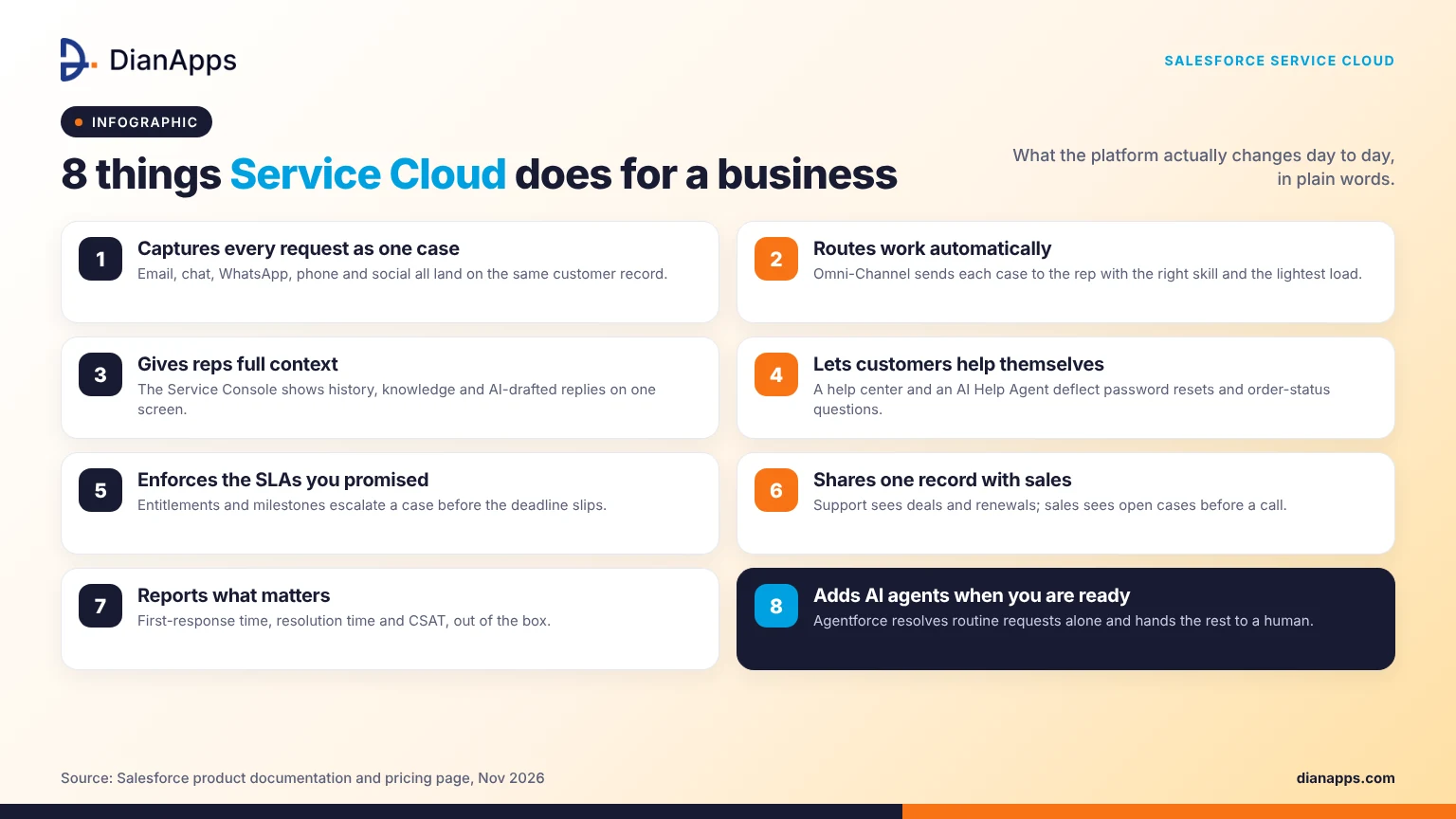
Service Cloud does four things for a business: it captures every request in one place, routes work automatically, gives reps the context to resolve issues on first contact, and lets customers help themselves. The result is shorter resolution times and fewer repeat contacts. Salesforce’s May 2026 survey of 3,075 service professionals found that customer satisfaction was the most improved KPI after AI agents were deployed, ahead of handle time and rep productivity.
Here is how that plays out day to day.
- Every channel lands on one case. Email, web forms, in-app chat, WhatsApp, SMS, phone, and social posts all create or update a case. A customer can start on chat and finish on the phone without repeating anything.
- Work is routed, not grabbed. Omni-Channel sends each case to the rep with the right skill and the lightest load. Managers set the rules once. Nobody cherry-picks easy tickets.
- Reps get the answer, not just the question. The Service Console shows the customer’s record, past cases, knowledge articles, and suggested replies on one screen. Einstein and Agentforce draft responses and summarize cases when they close.
- Customers solve simple problems alone. A help center, a knowledge base, and an AI help agent handle password resets, order status, and “how do I” questions. Those requests never reach a human.
What are the main Salesforce Service Cloud features?
The main Salesforce Service Cloud features are case management, Omni-Channel routing, the Service Console, a knowledge base, self-service help centers, messaging channels, Service Cloud Voice, Agentforce AI agents, and reporting. Which ones you get depends on the edition. Case management and the help center are in every edition; the full AI suite is in Max only.
Case management
A case is the record of one customer problem from open to close. Service Cloud assigns it, tracks it against a service-level agreement, escalates it when a deadline slips, and stores every email and note on it. Entitlements and milestones enforce the response times you promised in a contract.
Omni-Channel routing
Omni-Channel is the routing engine. It looks at a rep’s skills, capacity, and status and pushes the next case to them. Skills-based routing sends a billing dispute to someone who handles billing. Queue-based routing is simpler and works for small teams.
Service Console and Agentforce Service Rep assistant
The console is the rep’s workspace. Tabs, a customer sidebar, a knowledge panel, and macros sit on one screen. In Advanced and Max editions, an AI assistant drafts replies, recommends knowledge articles, and writes the case summary. Reps approve the draft rather than typing from scratch.
Knowledge base and help center
Knowledge is a library of articles that reps use internally, and customers read in a help center. Articles are versioned, approved, and searchable. A good knowledge base is the raw material for every AI agent, so this feature matters more now than it did two years ago.
Messaging channels
Messaging covers web chat, in-app chat, WhatsApp, SMS, Facebook Messenger, and Apple Messages for Business. Conversations are asynchronous, so a customer can reply hours later and keep the same thread. Enhanced Messaging is an add-on at $75 per user per month on the Core edition and above.
One important change: the legacy Chat product, formerly called Live Agent, was retired on 14 February 2026. Any business still on it has lost access and must move to Messaging for In-App and Web, now called Enhanced Chat (Salesforce developer documentation).
Service Cloud Voice
Service Cloud Voice brings the phone into the console. Calls are transcribed in real time, the transcript is attached to the case, and the AI can suggest next steps while the call is live. It works with Amazon Connect or a partner telephony provider. Voice is a paid add-on and is billed partly on call minutes, so budget for it separately.
Reporting and Service Intelligence
Standard reports cover case volume, first-response time, resolution time, and CSAT. Service Intelligence adds prebuilt dashboards on Data 360 for trend analysis across channels. Most teams start with the standard reports and add Service Intelligence once volume justifies it.
How does Agentforce change Salesforce Service Cloud?
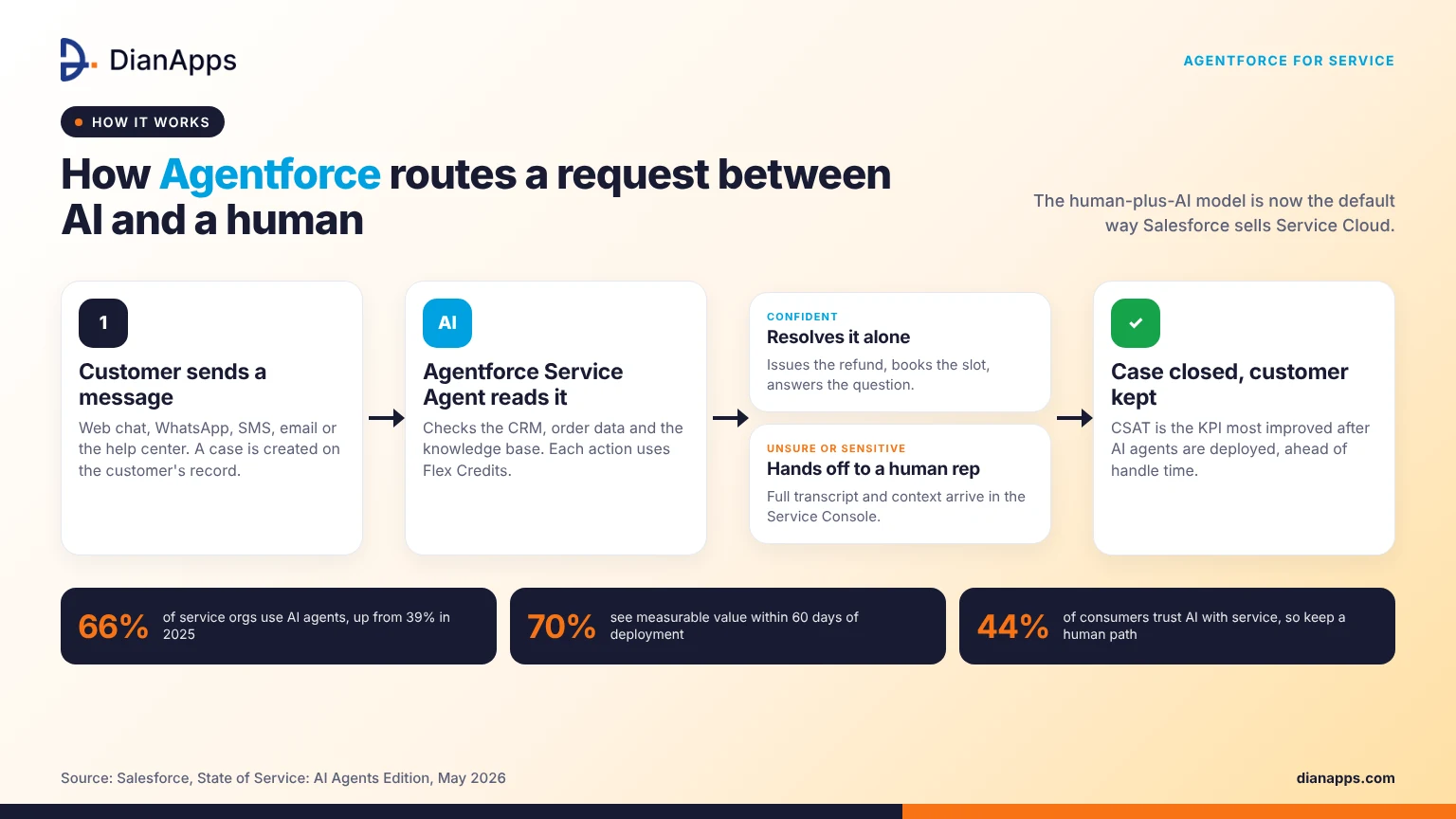
Agentforce adds autonomous AI agents to Service Cloud. An Agentforce Service Agent reads a customer’s message, checks the CRM and the knowledge base, takes an action such as issuing a refund or booking a slot, and hands off to a human when it is unsure. The human-plus-AI model is now the default way Salesforce sells Service Cloud, which is why the product pages say “Agentforce Service.”
There are three pieces to understand.
- The Help Agent (Casey): This is the customer-facing agent on your help center and messaging channels. It is included in Advanced and Max, and it can be bought on outcome-based pricing, where you pay per resolved conversation rather than per seat.
- The Service Rep assistant: This agent works alongside your human reps inside the console. It drafts, summarizes, and recommends. It does not talk to customers.
- Flex Credits: Agent actions consume credits. Core includes 500,000 credits per org per year, Advanced 1 million, and Max 2.75 million. Heavy automation on a lower edition means buying more credits, so model your volume before you choose.
Agentforce depends on Data 360 (formerly Data Cloud) to see information outside Salesforce, such as order history in an ERP. If your customer data lives in several systems, budget for that integration first. For a plain-language comparison of the older Einstein tools and Agentforce, see Agentforce vs Einstein.
Two cautions from Salesforce’s own research. Seventy percent of adopters saw measurable value within 60 days, but 72% of service operations professionals call data readiness a major blocker. And while 65% of service professionals believe customers fully trust AI, the Metrigy Consumer CX Index cited in the same report puts real consumer trust at 44%. Keep a visible path to a human.
What are the benefits of Salesforce Service Cloud for a business?
The benefits of Salesforce Service Cloud are faster resolution, lower cost per case, higher customer satisfaction, and a single customer record shared with sales. Smaller gains include fewer tools to pay for, clearer reporting, and support that scales without hiring at the same rate as volume.
- Faster resolution: Routing, a shared knowledge base, and AI drafting cut the time a case sits waiting. First-contact resolution rises because the rep sees the whole history.
- Lower cost per case: Self-service and AI agents take the repetitive 30% to 40% of requests off the human queue. The humans handle the cases that need judgment.
- Higher satisfaction and retention. Customers are not asked to repeat themselves. In Salesforce’s 2026 survey, satisfaction was the top improved metric after AI agents were introduced.
- One record with sales. A renewal conversation can be started with open cases in view. A support rep can flag an upsell. Standalone help desks cannot do this without integration work.
- Fewer tools. Chat, phone, knowledge, surveys, and reporting are one subscription rather than five. Consolidation is usually where the first year’s savings come from.
- Compliance and security. Field-level security, audit trails, Shield encryption, and data residency options are built in, which matters in finance, healthcare, and government.
How much does Salesforce Service Cloud cost in 2026?
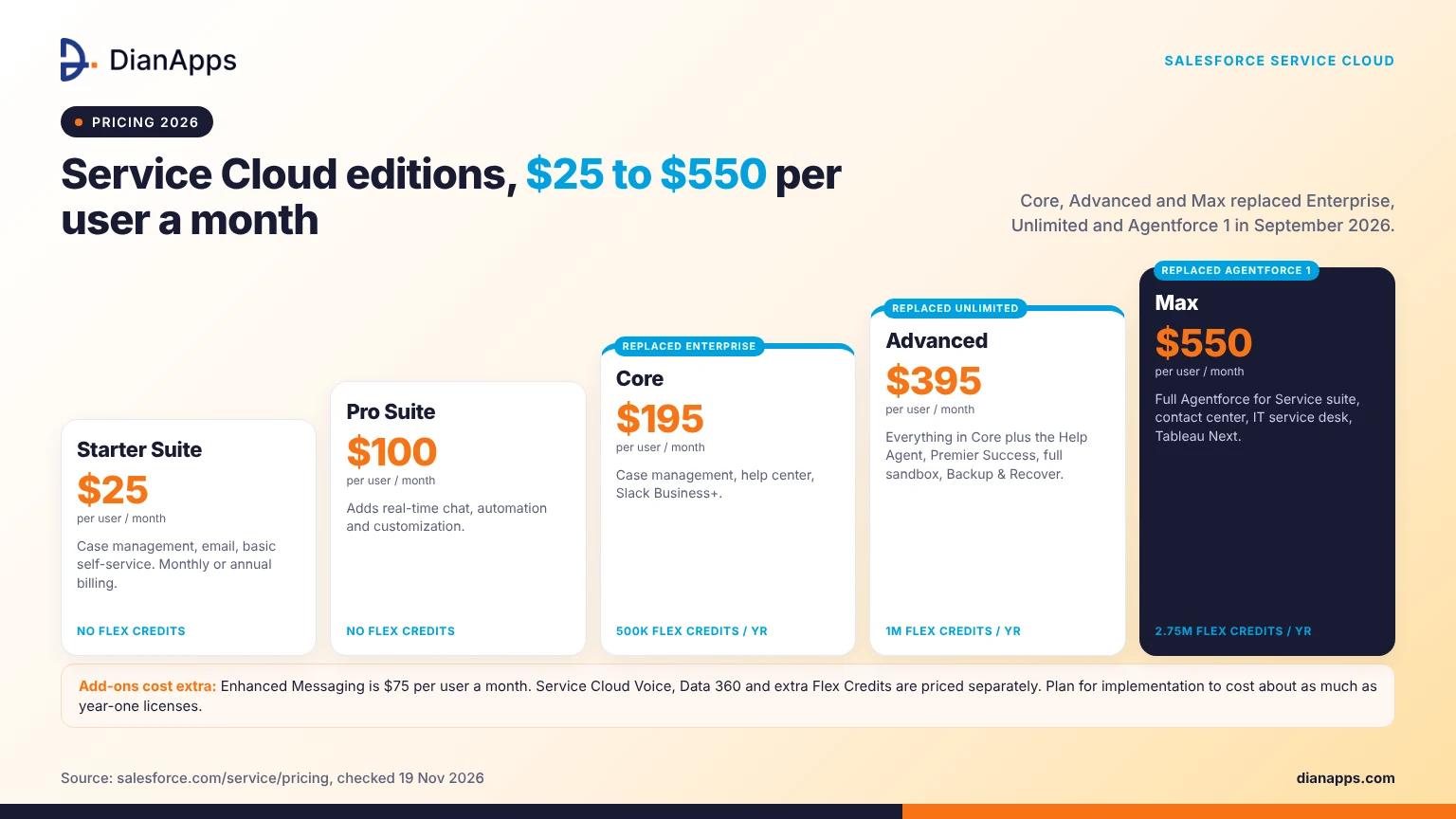
Salesforce Service Cloud costs between $25 and $550 per user per month in 2026, billed annually on most editions. On 3 September 2026, Salesforce replaced the Enterprise, Unlimited and Agentforce 1 editions with Core, Advanced and Max. Existing customers keep their old pricing until renewal, so your invoice may still show Enterprise.
| Edition | Price per user per month | What it adds | Flex Credits per org per year |
| Starter Suite | $25 | Case management, email, basic self-service | None |
| Pro Suite | $100 | Real-time chat, automation, customization | None |
| Core | $195 | Case management, help center, Slack Business+ | 500,000 |
| Advanced | $395 | Everything in Core plus the Help Agent, Premier Success, full sandbox, Backup and Recover | 1 million |
| Max | $550 | Everything in Advanced plus the full Agentforce for Service suite, contact center, IT service desk, Tableau Next | 2.75 million |
Source: Salesforce Service pricing page. Enhanced Messaging is $75 per user per month extra. Service Cloud Voice, Data 360 and extra Flex Credits are priced separately.
Licenses are usually less than half of the year-one cost. Implementation, data migration, integration, and training make up the rest. Our Salesforce pricing guide breaks down the full ladder, and the Salesforce ROI guide shows how to build the business case.
What is the difference between Sales Cloud and Service Cloud?
Sales Cloud manages the process of winning a customer; Service Cloud manages the process of keeping one. Both run on the same Salesforce database and share accounts, contacts, and activity history. Many companies run both, and Salesforce sells combined Sales and Service bundles for that reason.
| Sales Cloud | Service Cloud | |
| Core object | Lead, Opportunity | Case |
| Main user | Sales rep, sales manager | Support rep, service manager |
| Key features | Pipeline, forecasting, quoting, lead routing | Case routing, knowledge, Omni-Channel, messaging, Voice |
| AI agent | Agentforce SDR and Sales Coach | Agentforce Service Agent and Help Agent |
| Pick it when | You need to track and close deals | You need to resolve customer requests |
If your team does both from one inbox, start with Service Cloud. Cases are harder to manage in a spreadsheet than deals are. For the full set of Salesforce products, see our Salesforce clouds comparison guide.
How do you implement Salesforce Service Cloud?
Salesforce Service Cloud is implemented in five stages: define the service process, configure cases and routing, migrate data and build the knowledge base, integrate channels and other systems, then train reps and go live. A single-channel rollout for a small team takes 6 to 10 weeks. A multi-channel contact center with Voice and Agentforce takes 4 to 6 months.
- Map the current process first. List every channel, every queue, and every escalation rule you use today. Decide which of them you want to keep. Service Cloud will faithfully automate a broken process if you let it.
- Configure the basics before anything clever. Case fields, record types, assignment rules, SLAs, and the console layout. Get reps using the console with email alone.
- Build the knowledge base early.AI agents and reps both depend on it. Migrate the best 50 articles, not all 500.
- Add channels one at a time. Messaging first, then Voice. Each channel changes staffing and routing.
- Pilot Agentforce on one use case. Order status or password resets are the usual first picks. Measure deflection and hand-off rate before you expand.
The step-by-step detail, including sandbox strategy and user acceptance testing, is in our Salesforce implementation guide.
Planning a Service Cloud rollout?
Our Salesforce Service Cloud services team scopes it in a free 30-minute call.
What are common Salesforce Service Cloud use cases?
The most common Service Cloud use cases are high-volume B2C support, B2B technical support with SLAs, field service dispatch, internal IT help desks, and regulated-industry service in banking, insurance, and healthcare. The product is the same in each; the configuration is different.
- Retail and e-commerce: order status, returns and refunds over messaging, with an AI agent handling the first contact.
- SaaS and technical support: tiered queues, entitlements tied to contracts, and a public knowledge base that deflects tickets.
- Banking and insurance: case handling with audit trails, consent tracking, and Shield encryption. Financial Services Cloud adds the industry data model on top.
- Healthcare: patient inquiries and appointment requests, with Health Cloud for the clinical data model.
- Manufacturing and field service: warranty cases that turn into work orders through Field Service.
- Internal IT and HR: employee help desks using the same console, which the Max edition now includes.
When is Salesforce Service Cloud the wrong choice?
Service Cloud is the wrong choice when the team is under five agents on one channel, when customer data is scattered, and nobody owns cleaning it, or when the budget covers licenses but not implementation. In those cases, a simpler help desk costs less and goes live faster.
Three honest tests before you buy:
- Under roughly 500 cases a month, the routing and AI features will not pay for themselves. A $25 Starter seat may still make sense if you already run Sales Cloud.
- If account and contact records are duplicated or stale, fix that first. Seventy-two percent of service operations professionals name data readiness as the biggest blocker to AI, and the same problem blocks basic routing.
- Someone inside the company must own the configuration after go-live. A partner can build it, but an admin has to run it.
Do you need a Salesforce Service Cloud consulting partner?
You need a partner when the rollout touches more than one channel, needs integration with an ERP or telephony system, or includes Agentforce. A certified partner shortens the project, avoids the known configuration traps, and leaves your admin with documentation. For a single-channel Starter or Pro setup, an in-house admin with Trailhead training is usually enough.
What to ask a partner before you sign:
- How many Service Cloud projects have they delivered in your industry, and can you speak to one client?
- Will they configure routing and SLAs from your process, or from a template?
- Who writes the knowledge base, and who owns it after go-live?
- How do they price Agentforce pilots, and what deflection rate do they commit to measuring?
- What is handed over at the end: documentation, admin training, a backlog?
DianApps provides Salesforce consulting services and Service Cloud implementation for companies in the US, India, and beyond.
Conclusion
Salesforce Service Cloud helps a business by putting every customer request on one record, routing it to the right person or AI agent, and giving reps the context to resolve it the first time. In 2026, that also means Agentforce, new Core, Advanced, and Max editions, and the end of legacy chat. The decision is less about features and more about readiness: clean data, a knowledge base, and someone to own the system.
If you are weighing Service Cloud or planning a move to Agentforce, talk to our Salesforce Service Cloud services team. We will scope the rollout, tell you which edition you need, and say so if a simpler tool would serve you better.
 0 comments







Your email address will not be published. Required fields are marked *